Wikipedia, and virtually all other Wiki projects that are run under the umbrella of the Wikimedia Foundation, are using an open-source software called MediaWiki. It is also used outside the Wikimedia universe, in a wide range of settings. For example, researchers are aggregating information about biochemical pathways in the WikiPathways project, German-speaking patients with cluster headaches use it for creating their own knowledge base, and in the Personal Science Wiki people are sharing their n-of-1 citizen science efforts.
To facilitate the programmatic and automatic access to the pages that people create, MediaWiki (and the Wikimedia Foundation) offer different APIs that can be used to access data and edit objects in Wikipedia and its many sister projects.
Namely, there are three different API classes with different focuses on use cases, two of which based are on the REST style:
Wikimedia REST API (pro: fast/simple access, con: limited to very narrow types of data necessary for content)
MediaWiki REST API (pro: also simple/fast access, con: limited to certain types of data)
MediaWiki Action API (pro: very powerful, gives access to virtually all types of data, con: harder to use, rate-limited when used remotely)
Wikimedia REST API
This custom API – that is particular to the Wikimedia projects – is designed for delivering high-throughput access to the content and metadata of Wikimedia projects in different, machine-readable formats. As a result, it offers a very narrow and highly optimized access to ‘live’ pages and content.
This focus makes it less relevant for research, where we might want to understand longitudinal changes in how articles have evolved.
MediaWiki REST API
The standard REST API of MediaWiki is present in all MediaWiki installations and can be used to get data in JSON or HTML from them. Similar to the Wikimedia-specific API, this is mostly useful for accessing current data through simple API endpoints that return fast responses.
For those reasons, depending on the research question, it might be of limited utility.
MediaWiki Action API
The Action API is the most powerful API that MediaWiki offers. Beyond accessing a wide range of data, it can even be used to submit and edit data. For this reason, it is also at the heart of the large service bot ecosystem of Wikipedia and its related projects. Run by Wikipedia contributors, these bots help detect wrongly formatted citations, replace broken links with still accessible archived versions, or fix common language issues.
It also offers the most possibilities to access data from Wikipedia for research purposes, as it provides the detailed edit histories of pages, allows detailed searches across pages and users, and also provides access to public user details, like a user’s editing history, gender (if provided) and other details.
We will focus on the Action API in the following materials.
Using the Action API with PyWikiBot
The Action API can be used through any programming language by sending correctly formatted HTTP requests to it, but as the API is very feature-rich, this quickly becomes quite complex.
Luckily, the Wikimedia Foundation maintains a Python library called Pywikibot that can be used interact with the various endpoints the API offers and also wraps the responses into objects that are easier to work with. Importantly, it also ensures that we honor the rate limits of the API, to ensure we don’t overwhelm the server endpoints.
If you want to use the library locally, it can be installed through pip from the commandline:
pip install pywikibot
After the installation, we also need to create a user config, in which we need to add our username that we use to identify us as the user of the API. To create the file you can run the following from your terminal:
pwb generate_user_files
It creates a small user-config.py file in which we add the configuration details. This file should be located in the same folder from which you will run your Python scripts.
You can now start a Jupyter notebook and start interacting with the API.
First, to confirm that the config is found in the notebook, we run the following:
We see the username details, here for the English language-version of Wikipedia, as well as some further language versions and Wikidata.
Using PAWS
PAWS is the Jupyter Notebook/Lab environment that is hosted on the servers of the Wikimedia Foundation (WMF). That means, you don’t have to install anything locally on your computers, and all of the actual computations are happening on the servers of the WMF. Instead, you can access the compute environment via your web browser.
The virtual compute resources that PAWS provides to each user include 1 CPU, 2G of RAM and 5G of storage. This should be enough for many research projects, especially to get started.
One important thing to keep in mind: All notebooks you write on PAWSare publicly accessible, so don’t share passwords or other private information in it!
Accessing PAWS
To access PAWS you will need a single user wikimedia account. These accounts are shared between all Wikimedia projects (like the different Wikipedia language editions and Wikidata), including PAWS. If you don’t have an account yet, you can create one here.
Using PAWS has the additional benefit that it comes with PyWikiBot preconfigured to use your unified user account, so you don’t have to do any heavy lifting for setting it up.
For this reason, we will be using PAWS for the rest of this course, ensuring that your development environment for accessing Wikipedia is pre-configured.
Getting started using PyWikiBot
Now we can actually go ahead with loading the libary, confirming once more that the username was correctly set, and do our first query of Wikipedia through the library.
For that, we create a site object, that tells pywikibot which Wikimedia project we want to interact with, by giving the same 2-letter acronym of the language, and the project itself.
We can then use the site object to query through the pywikibot, for example for the page on computational social sciences:
import pywikibotprint("Config: {}\n".format( pywikibot.config.usernames) )site = pywikibot.Site('en', 'wikipedia') # select the wikimedia project we want to interact withpage = pywikibot.Page(site, "Computational social science") # give name of page we want to useprint("Title: {}\n".format( page.title() ))print("Start of article:\n\n{}…\n".format( page.text[:1000] ))
Config: defaultdict(<class 'dict'>, {'wikipedia': {'en': 'Gedankenstuecke', 'de': 'Gedankenstuecke', 'es': 'Gedankenstuecke', 'fr': 'Gedankenstuecke', 'it': 'Gedankenstuecke'}, 'wikidata': {'wikidata': 'Gedankenstuecke'}})

Title: Computational social science

Start of article:

{{Short description|Academic sub-disciplines}}
{{broader|Quantitative social research}}

'''Computational social science''' is an interdisciplinary academic sub-field concerned with computational approaches to the [[social science]]s.
This means that computers are used to model, simulate, and analyze social phenomena.
It has been applied in areas such as [[computational economics]], [[computational sociology]], computational media analysis, [[cliodynamics]], [[culturomics]], [[nonprofit studies]].<ref>{{Cite journal |last1=Ma |first1=Ji |last2=Ebeid |first2=Islam Akef |last3=de Wit |first3=Arjen |last4=Xu |first4=Meiying |last5=Yang |first5=Yongzheng |last6=Bekkers |first6=René |last7=Wiepking |first7=Pamala |date=February 2023 |title=Computational Social Science for Nonprofit Studies: Developing a Toolbox and Knowledge Base for the Field |journal=Voluntas |language=en |volume=34 |issue=1 |pages=52–63 |doi=10.1007/s11266-021-00414-x |issn=0957-8765|doi-access=free |hdl=1805/31787 |hdl…
Exploring a page object
We now got the page on Computational social science in the page object and can access information from it, e.g. using a function like page.title() or accessing data like page.text above.
To see the full list of methods and values associated with it, we can see all of them like this below (we use the filtering approach, as dir(page) in itself would show all methods, including private ones that aren’t supposed to be used directly).
There is a couple of interesting methods we will look at more closely: authorship, contributors, revisions, and categories.
Authorship
To check how authorship for the current, i.e. latest version of the page distributes across different contributors, we can use the authorship method. Each tupel of the form (1234, 50.0) gives the authorship in character count (1234) and percentage of the article (50.0):
We can see that both registered accounts (MattiMelimarkka) as well as anonymous contributors have made edits. In the past, anonymous contributions were saved under the IP address from which edits were made (e.g. 2605:E000:1521:DB:B1CE:3E73:4742:6DD8 or 46.233.116.47), while today temporary user names are assigned (e.g. ~2025-34400-27).
Contributors
Instead of just looking at the latest version, we can also get the list of all people who ever contributed and their number of edits, using the contributors method. This will give us a tuple containing the username and the number of edits:
With this, we now also see some of the service bots that identify as such in their name already, like the WikiCleanerBot or the InternetArchiveBot.
Page revisions
If we want to understand the actual editing history of the page, we can get a list of all revisions, which allows us to see how the page evolved over time.
Note: We’ll just look at the 10 most recent edits to keep the notebook a bit cleaner, but in principle you can see all edits by not using break
print("This page has {} revisions".format(page.revision_count()))rev =0for revision in page.revisions():print("{} edited the article on {} with this edit comment:\n\t{}\n---".format( revision['user'], revision['timestamp'], revision['comment'])) rev +=1if rev >10:break
This page has 135 revisions
SchlurcherBot edited the article on 2026-02-12T21:46:58Z with this edit comment:
    Bot: http → https
---
Monkbot edited the article on 2025-11-27T20:44:07Z with this edit comment:
    /* Definitions */ [[User:Monkbot/task 21: Replace page(s) with article-number|Monkbot/task 21: Replace page(s) with article-number]];
---
OAbot edited the article on 2025-11-24T07:09:33Z with this edit comment:
    [[Wikipedia:OABOT|Open access bot]]: pmc updated in citation with #oabot.
---
~2025-34400-27 edited the article on 2025-11-18T00:06:45Z with this edit comment:
    Added Gilardi and Bermejo as benchmarks against humans
---
Monkbot edited the article on 2025-09-30T07:15:29Z with this edit comment:
    /* Definitions */ [[User:Monkbot/task 21: Replace page(s) with article-number|Monkbot/task 21: Replace page(s) with article-number]];
---
Folkezoft edited the article on 2025-08-13T03:00:35Z with this edit comment:
    /* Definitions */ Tag [[Wikipedia:Bare URLs|Bare URLs]] using [[Wikipedia:AutoWikiBrowser|AWB]]
---
David Delony edited the article on 2025-04-21T00:43:12Z with this edit comment:
    /* See also */ Added link to computational statistics article.
---
Allforrous edited the article on 2025-02-27T22:44:19Z with this edit comment:
    /* External links */ Commonscat template.
---
Sythoz edited the article on 2024-12-11T18:29:28Z with this edit comment:
    removed too special database history link, added "social physics" to the "See also"
---
LucasBrown edited the article on 2024-05-08T15:01:44Z with this edit comment:
    Adding local [[Wikipedia:Short description|short description]]: "Academic sub-disciplines", overriding Wikidata description "academic sub-disciplines concerned with computational approaches to the social sciences"
---
Citation bot edited the article on 2024-04-04T11:56:42Z with this edit comment:
    Altered journal. Add: bibcode, title, authors 1-1. Removed URL that duplicated identifier. Changed bare reference to CS1/2. Removed parameters. Some additions/deletions were parameter name changes. | [[:en:WP:UCB|Use this bot]]. [[:en:WP:DBUG|Report bugs]]. | Suggested by Abductive | [[Category:Wikipedia articles in need of updating from March 2024]] | #UCB_Category 101/720
---
By default, the revisions that are returned do not include the text of the previous revisions, but if we pass content=True in the method call, those will be returned too:
for revision in page.revisions(content=True):print(revision.text[:500])break
{{Short description|Academic sub-disciplines}}
{{broader|Quantitative social research}}

'''Computational social science''' is an interdisciplinary academic sub-field concerned with computational approaches to the [[social science]]s.
This means that computers are used to model, simulate, and analyze social phenomena.
It has been applied in areas such as [[computational economics]], [[computational sociology]], computational media analysis, [[cliodynamics]], [[culturomics]], [[nonprofit studies
Categories
In Wikipedia, virtually all articles are in one to many different categories. We can explore which category a page belongs to through the page.categories method:
for cat in page.categories():print(cat)
[[en:Category:All Wikipedia articles in need of updating]]
[[en:Category:All articles with bare URLs for citations]]
[[en:Category:Articles with bare URLs for citations from August 2025]]
[[en:Category:Articles with short description]]
[[en:Category:Commons category link is defined as the pagename]]
[[en:Category:Computational social science]]
[[en:Category:Short description is different from Wikidata]]
[[en:Category:Webarchive template wayback links]]
[[en:Category:Wikipedia articles in need of updating from March 2024]]
Exploring a user object
Above, we have seen how we can access pages in Wikipedia and also get some details about how edited that given page. The API also offers method to dig a bit into who those contributors are and what edits they made.
To access details about a single user, we can use pywikibot.User and then look at the methods that are accessible. Here, we are using Bastian’s user name to be able to get some ‘real’ data for demonstration purposes, but of course you can replace Gedankenstuecke with any user name.
user = pywikibot.User(site, "Gedankenstuecke") [i for i indir(user) ifnot i.startswith("_")]
Some interesting bits for users are the editCount, if they gave their gender, if they are currently blocked from editing, and also what contributions they made. Let’s explore those:
print("user gave gender as {}".format( user.gender() ))print("user is blocked? {}".format( user.is_blocked() ))print("user made {} edits\n".format( user.editCount() ))print("user contributions:")c =0for contrib in user.contributions():print(contrib) c +=1if c >10:break
user gave gender as unknown
user is blocked? False
user made 149 edits

user contributions:
(Page('Sierras de Córdoba'), 1352554752, Timestamp(2026, 5, 4, 22, 8, 44), 'fix name of cerro mogote')
(Page('Sierras de Córdoba'), 1352554625, Timestamp(2026, 5, 4, 22, 7, 29), 'add details about los gigantes as natural reserve and tourism spot')
(Page('Los Gigantes'), 1352553589, Timestamp(2026, 5, 4, 21, 57, 18), 'add disambiguation option')
(Page('Draft:Stuart Vines'), 1351709685, Timestamp(2026, 4, 29, 17, 26, 26), 'fix name spelling in infobox')
(Page('Draft:Stuart Vines'), 1351703667, Timestamp(2026, 4, 29, 16, 36, 38), 'Submitting using [[WP:AFCSW|AfC-submit-wizard]]')
(Page('Draft talk:Stuart Vines'), 1351703585, Timestamp(2026, 4, 29, 16, 35, 39), 'Adding WikiProject tags ([[MediaWiki:AFC-add-project-tags.js|assisted]])')
(Page('Draft:Stuart Vines'), 1351703472, Timestamp(2026, 4, 29, 16, 34, 49), '-- Draft creation using the [[WP:Article wizard]] --')
(Page('Tupungato'), 1351597508, Timestamp(2026, 4, 29, 0, 10, 30), 'add detail to first ascent')
(Page('Tupungato'), 1351586099, Timestamp(2026, 4, 28, 22, 31, 2), "add eastern ascent by Viero and Rabal, their death and recovery of Viero's backpack incl. proof of ascent")
(Page('Talk:Darren Beattie'), 1350906013, Timestamp(2026, 4, 24, 19, 15, 45), '/* Involvement in policy for visa restrictions against noncitizen researchers, fact-checkers, and trust/safety workers */ new section')
(Page('UK Biobank'), 1350766688, Timestamp(2026, 4, 23, 22, 15), 'add coverage about uk biobank data for sale on alibaba')
Accessing categories
We have already seen that pages can be in different categories. Categories are a particular type of page that is used to group pages that belong together.
We can also use categories as a starting point to get a collection of related pages. To do that, we use the pywikibot.Category method, using the Kenyan politicians category as a starting point:
site = pywikibot.Site('en', 'wikipedia') # select the wikimedia project we want to interact withpolitician_pages = [] # to store page names and handles after iterating over categorycategory = pywikibot.Category(site, "Kenyan politicians") # select categoryfor i in category.articles(): politician_pages.append(i)print("There are {} pages in the 'Kenyan politicians' category".format(len(politician_pages)))
There are 102 pages in the 'Kenyan politicians' category
By iterating over the category, we find 102 pages that are part of it.
While this is a good starting point, in reality the English language edition of Wikipedia has more pages about Kenyan politicians and who aren’t listed in this category, due to how sub-categories in Wikipedia work.
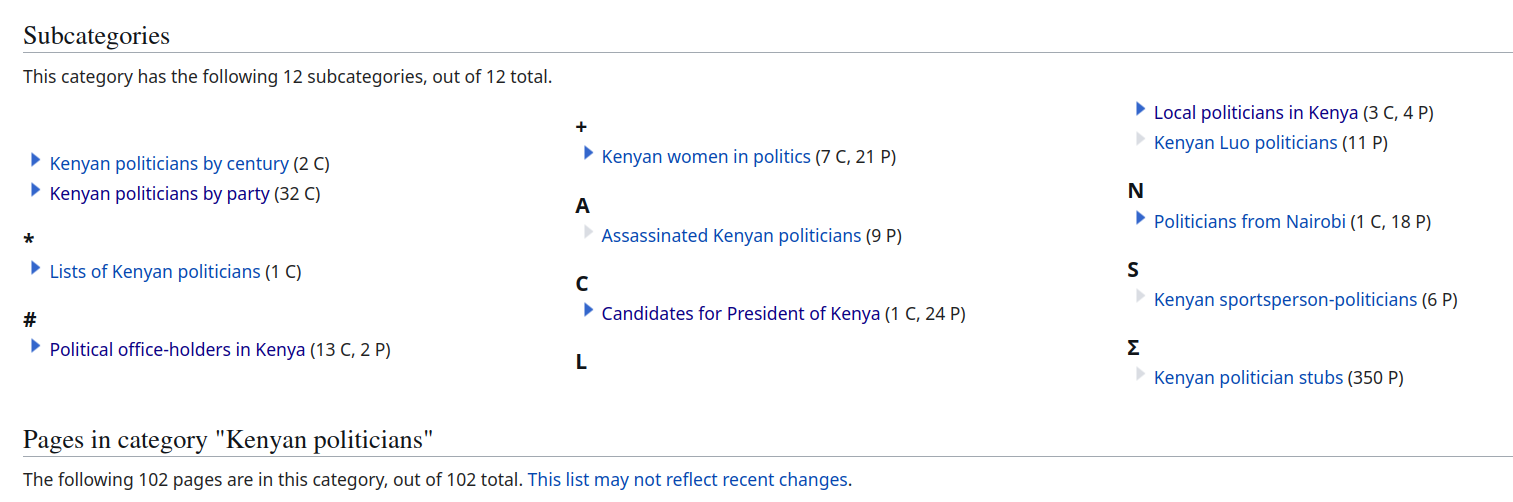
If we go to the Category on Wikipedia, we see 12 sub-categories for e.g. Kenyan politicians by party, stubs (new/short articles) and more.
image.png
Pages in these sub-categories won’t be listed as part of the higher-level category by default. But we can recurse through those lists to ensure that we also get those pages in the subcategories:
for i in category.articles(recurse=True): politician_pages.append(i)print("There are {} pages in the 'Kenyan politicians' category".format(len(politician_pages)))
There are 1039 pages in the 'Kenyan politicians' category
This now gives us a substantially larger number of pages about Kenyan politicians to work with.
Aggregating and Exploring the data
Now that we have seen the different ways that we can access this data, let’s start to aggregate and visually explore this data a bit.
Maybe we would ultimately like to have a large DataFrame or table, that contains the full edit history for all the pages in our category of interest, to explore how pages changed over time..
Using a single page as an example
To get started, we will go through the process by using a single page of the category for demonstration purposes - and then plot the contributions per user to this article – as measured by the number of submitted revisions and the total of added/removed characters as well.
We then:
get all the revisions into a dataframe
add the page title (which we will need for merging all pages into one table later on), and
calculate the size difference of the article, to evaluate how much text each edit added/removed
import pandas as pd # load pandas to get Dataframes and all related methodsp = politician_pages[2] # pick an article# get all revisions for the article, including the actual articledf = pd.DataFrame(p.revisions(content=True)) # add title, which is missing from revisions, as new column `page_title`df['page_title'] = p.title() # calculate size difference between revisions using current/previous revisiondf['size_difference'] = df['size'] - df['size'].shift(periods=-1, fill_value=0) df.head(5)
revid
parentid
user
temp
userid
timestamp
size
sha1
roles
slots
...
parsedcomment
tags
anon
minor
userhidden
commenthidden
text
contentmodel
page_title
size_difference
0
1353017535
1352955026
~2026-27873-85
53666482
2026-05-07 17:27:58
11702
54f895c341ba5e02ffaee873e5003946a7571ada
[main]
{'main': {'contentmodel': 'wikitext', 'content...
...
<span class="autocomment"><a href="/wiki/Rosly...
[mobile edit, mobile web edit]
False
False
False
False
{{Short description|Kenyan politician (born 19...
wikitext
Roslyne Akombe
-8
1
1352955026
1345291761
~2026-27566-80
53657954
2026-05-07 06:56:46
11710
e6578bd9c7ae21879052ce70ed519d8c047ced07
[main]
{'main': {'contentmodel': 'wikitext', 'content...
...
[wikieditor]
False
False
False
False
{{Short description|Kenyan politician (born 19...
wikitext
Roslyne Akombe
16
2
1345291761
1342238182
LionmerterTHE
NaN
49865477
2026-03-25 10:34:29
11694
98f8589ccba62702aa5d4b4611a4a8c3b0caea6a
[main]
{'main': {'contentmodel': 'wikitext', 'content...
...
<span class="autocomment"><a href="/wiki/Rosly...
[AWB]
False
True
False
False
{{Short description|Kenyan politician (born 19...
wikitext
Roslyne Akombe
-1
3
1342238182
1327823244
Ser Amantio di Nicolao
NaN
753665
2026-03-07 21:29:55
11695
8631fa0b036c31c21567e51cac3cb44a82b3ecb6
[main]
{'main': {'contentmodel': 'wikitext', 'content...
...
<span class="autocomment"><a href="/wiki/Rosly...
[AWB]
False
False
False
False
{{Short description|Kenyan politician (born 19...
wikitext
Roslyne Akombe
-25
4
1327823244
1327823189
Eleosyne
NaN
49749298
2025-12-16 08:04:46
11720
b1c7e676b7268b23f046cd7e7b78f14109d50156
[main]
{'main': {'contentmodel': 'wikitext', 'content...
...
Added a category
[visualeditor]
False
False
False
False
{{Short description|Kenyan politician (born 19...
wikitext
Roslyne Akombe
30
5 rows × 21 columns
Plotting the number of edits per editor
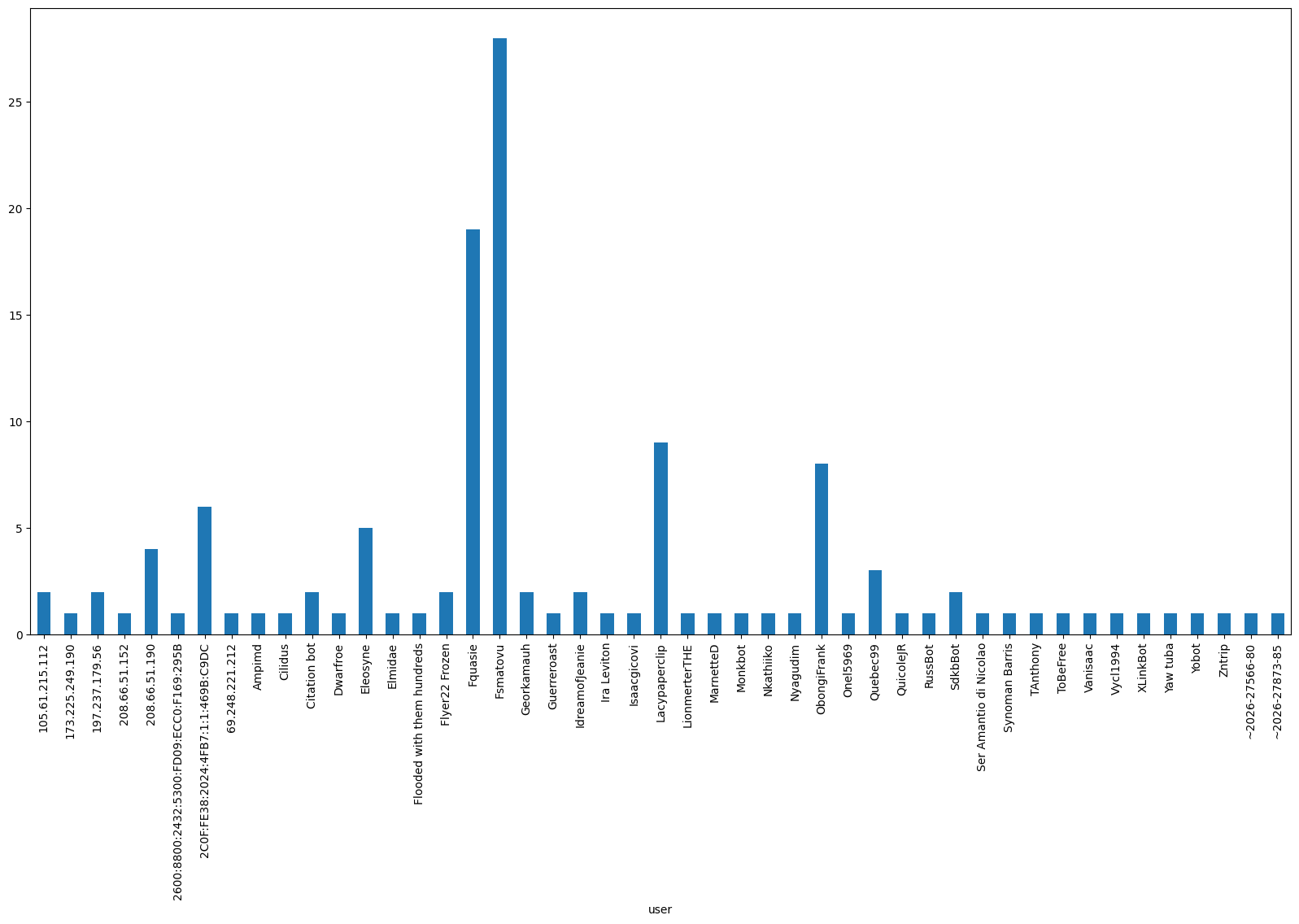
For this chosen page, let’s now visualize the number of edits made by the different editors as measured by saved revisions:
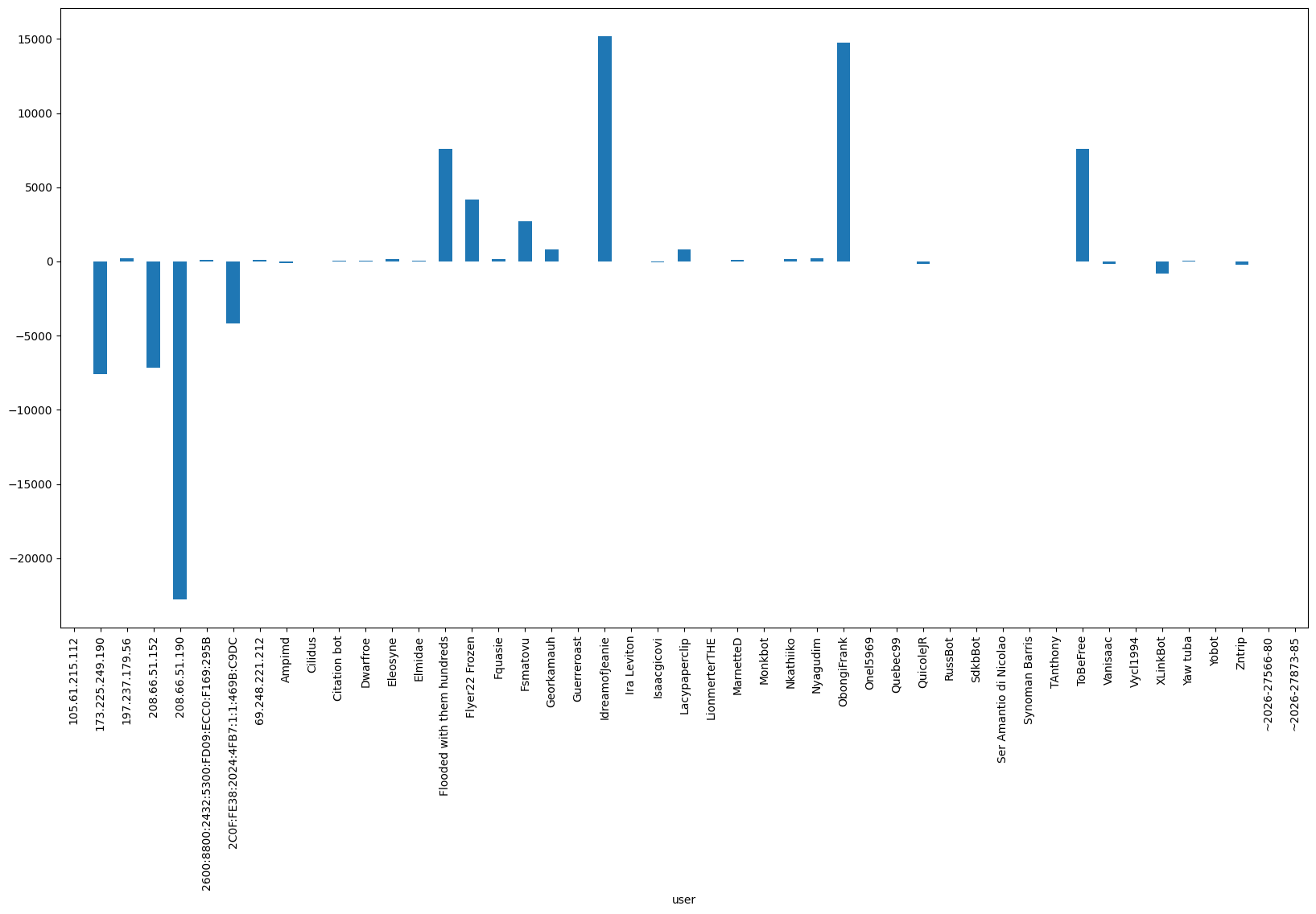
Plotting the overall size change made by the editor
Of course, the number of revisions does not tell us everything. Some editors might make big edits in a single change, while others might break their edits in many small changes. And some might mostly add new information, while others delete outdated/wrong details. So let’s look at the ‘article size changes’ per editor:
Note: A user could show up as “zero” edits, if they added and removed text of the same volume
Now that we better understand the type of data we will get, and got a working code to create a DataFrame over all revisions of a single page, let’s zoom one more step out - and create it for all pages in our category.
Warning: Actually executing this code will likely take a while given the API rate limits that MediaWiki enforces and that Pywikibot will respect.
# create empty dataframe to hold all data eventuallydf_politicians = pd.DataFrame()for p in politician_pages:# create dataframe that holds the revisions for a given page# also add the title & size diff as above df = pd.DataFrame(p.revisions(content=True)) df['page_title'] = p.title() df['size_difference'] = df['size'] - df['size'].shift(periods=-1, fill_value=0)# if this is not first iteration, concatenate existing data & new pageifnot df_politicians.empty: df_politicians = pd.concat([df_politicians, df])# otherwise just create aggregate DF else: df_politicians = df# Let's save our data in a CSV file, especially given how long it can take to run thisdf_politicians.to_csv('pages_category_kenyian_politicians.csv')df_politicians.head()
revid
parentid
minor
user
userid
timestamp
size
sha1
roles
slots
...
anon
userhidden
commenthidden
text
contentmodel
page_title
size_difference
temp
sha1hidden
suppressed
0
1285549690
1284245409
True
Almaddy2022
44620763.0
2025-04-14 10:08:57
4224
dac6097a46b4f8553538a7cd72f8e21144a98f25
[main]
{'main': {'contentmodel': 'wikitext', 'content...
...
False
False
False
{{short description|Kenyan writer and politica...
wikitext
Abdilatif Abdalla
8
NaN
NaN
NaN
1
1284245409
1241910337
False
Almaddy2022
44620763.0
2025-04-06 12:24:59
4216
9702f3020b6af39bfe3d4c665ddff5caa65b9b51
[main]
{'main': {'contentmodel': 'wikitext', 'content...
...
False
False
False
{{short description|Kenyan writer and politica...
wikitext
Abdilatif Abdalla
93
NaN
NaN
NaN
2
1241910337
1215802812
True
Inter&anthro
18180119.0
2024-08-23 20:59:25
4123
3855f560b43074cb4ddf410042636935866d6e54
[main]
{'main': {'contentmodel': 'wikitext', 'content...
...
False
False
False
{{short description|Kenyan writer and politica...
wikitext
Abdilatif Abdalla
38
NaN
NaN
NaN
3
1215802812
1215802775
False
IOHANNVSVERVS
24759391.0
2024-03-27 06:08:59
4085
edde49d1d4e95abcdd491f4e142fdd2f3fed23eb
[main]
{'main': {'contentmodel': 'wikitext', 'content...
...
False
False
False
{{short description|Kenyan writer and politica...
wikitext
Abdilatif Abdalla
-1
NaN
NaN
NaN
4
1215802775
1215802684
False
IOHANNVSVERVS
24759391.0
2024-03-27 06:08:39
4086
6e4050681632db2525ccc51e26e2cf99ab2a9a42
[main]
{'main': {'contentmodel': 'wikitext', 'content...
...
False
False
False
{{short description|Kenyan writer and politica...
wikitext
Abdilatif Abdalla
13
NaN
NaN
NaN
5 rows × 23 columns
Making one large plot of number of edits per page
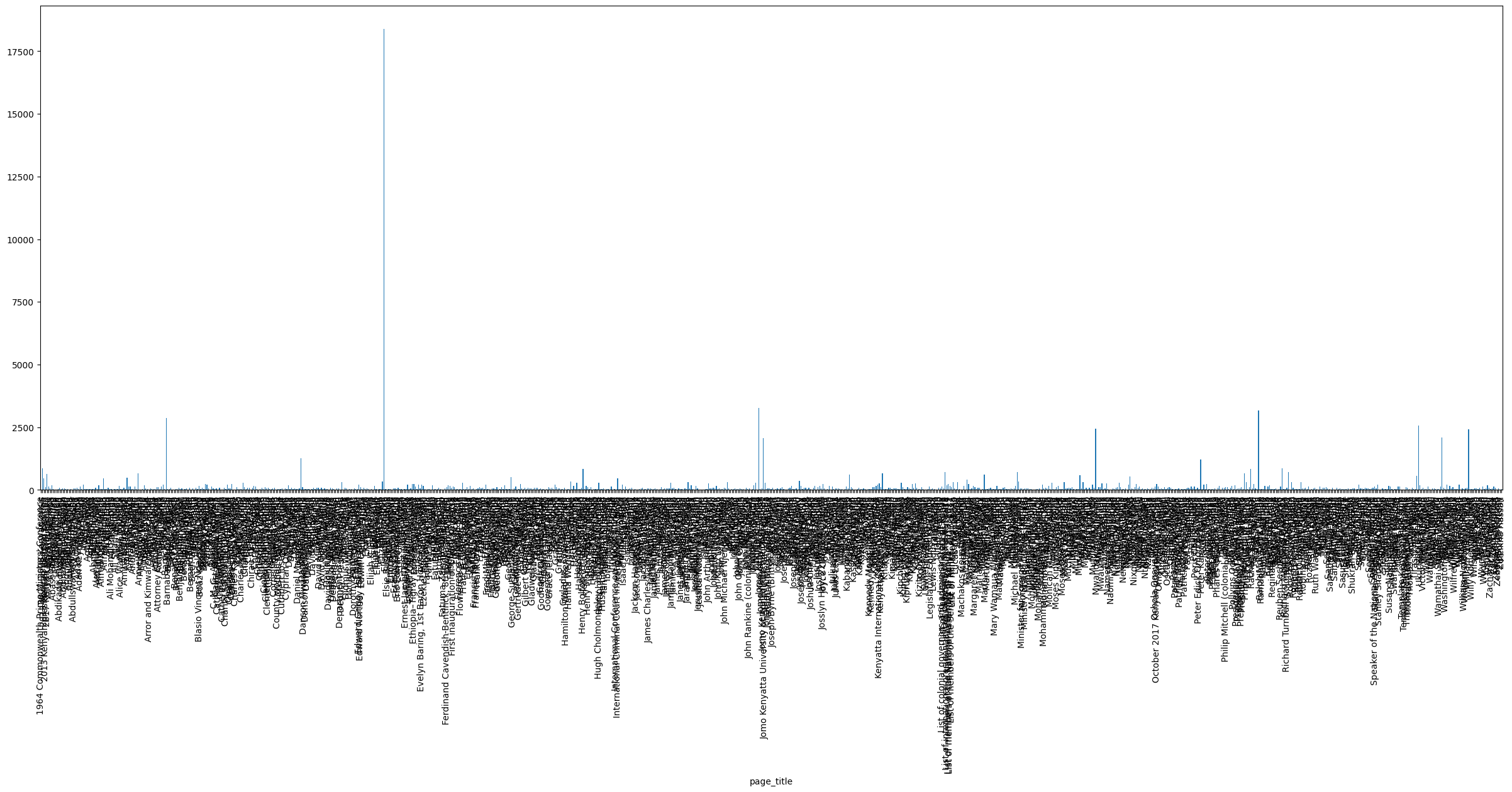
Now we can group the number of revisions per page title and put it all in one plot
If we look closely, there seems to be something noteworthy with those search results: Why did the pages for “Elizabeth II” and “Jomo Kenyatta International Airport” make our list of politicians?! Let’s hold that thought for a bit longer, when we’ll explore an alternative way to narrow down our pages of interest.
Creating a dataframe for editor details
For now, let’s do a similar approach for saving the details of the editors that have touched those pages that we have identified.
For a start, let’s just save the basic statistics for them, namely their total edit counts, gender (if entered), and whether they are registered users and/or bots.
Bots in Wikimedia are marked by the user group they belong to, so we can use the .groups() method and check if the account is part of it.
Note: Getting all those user details will take a long while, given that it’s > 20.000, so for demonstration purposes, the code below only does it for the first 100 users. The graphs below are actually looking at the full set of editors though
df_users = pd.DataFrame()count =0for user in df_politicians['user'].unique(): user = pywikibot.User(site, user) # get user object to manipulate groups = user.groups()if"bot"in groups: # to make it easier to see if user is a bot bot =Trueelse: bot =Falseiflen(user.first_edit) >2: # doesn't necessarily exist for some reason first_edit = user.first_edit[2]else: first_edit =Noneiflen(user.last_edit) >2: # doesn't necessarily exist for some reason last_edit = user.last_edit[2]else: last_edit =None df = pd.DataFrame([{'username' : user.username,'is_blocked': user.is_blocked(),'gender': user.gender(),'is_bot': bot,'first_edit': first_edit,'last_edit': last_edit,'editCount': user.editCount() }] )ifnot df_users.empty: df_users = pd.concat([df_users, df])else: df_users = df count +=1if count >100:#pass# otherwise, this runs for a very long time to actually get all the user data!breakdf_users.head(100)
# Use this to save the full list of users if you've used it, by uncommenting the line below# df_users.to_csv('users_who_edited_kenyian_politicians.csv')
Plotting the edit per user
Now, we can look at the editing behaviour of all of those users – across all articles they edited – by starting to make some plots.
Let’s start with a basic histogram over the edit counts. The x-axis will show us the number of edits in bins, the y-axis how many users made that many edits:
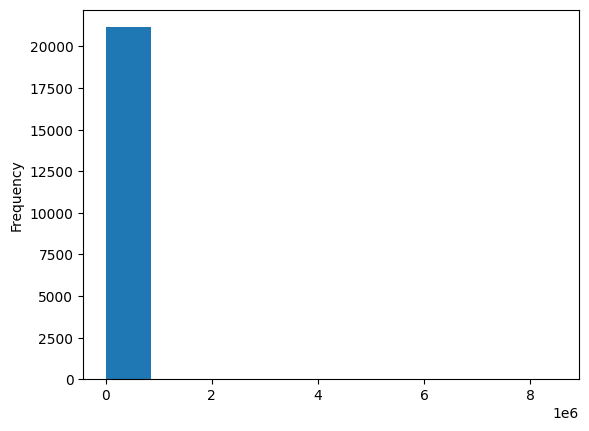
df_users['editCount'].plot(kind='hist')
That looks not super informative. The reason is that by default the plot command only creates 10 bins for the histogram. Plus, as for most online communities, we see a very strong participation inequality, also known as the 1% rule.
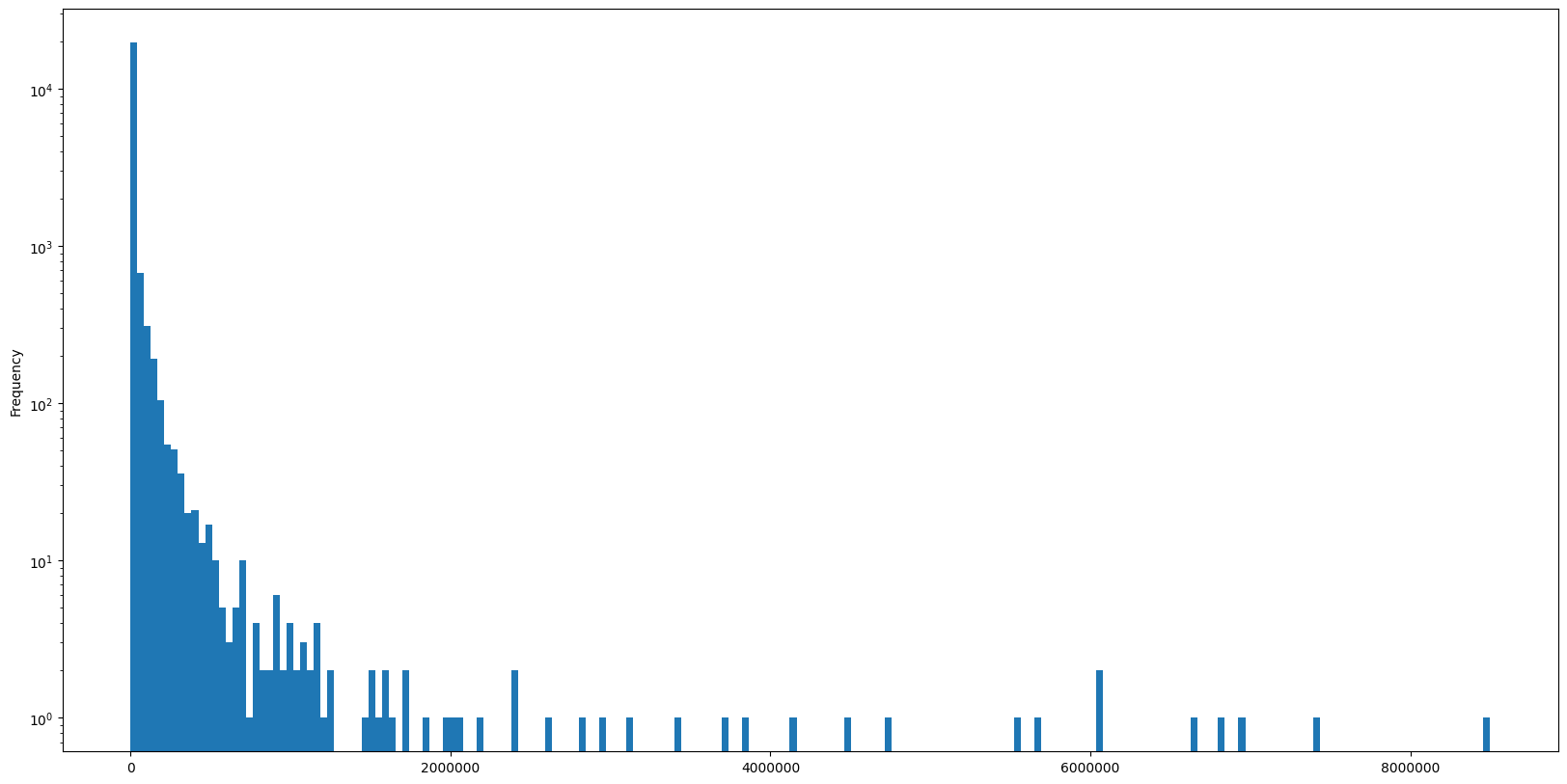
Let’s use a logarithmic scale for the y-axis, create 200 instead of 10 bins and disable the scientific notation on the x-axis:
That already looks more insightful. Es expected, the largest part of our users made compartively few edits, while there’s a few outliers that did a lot of edits.
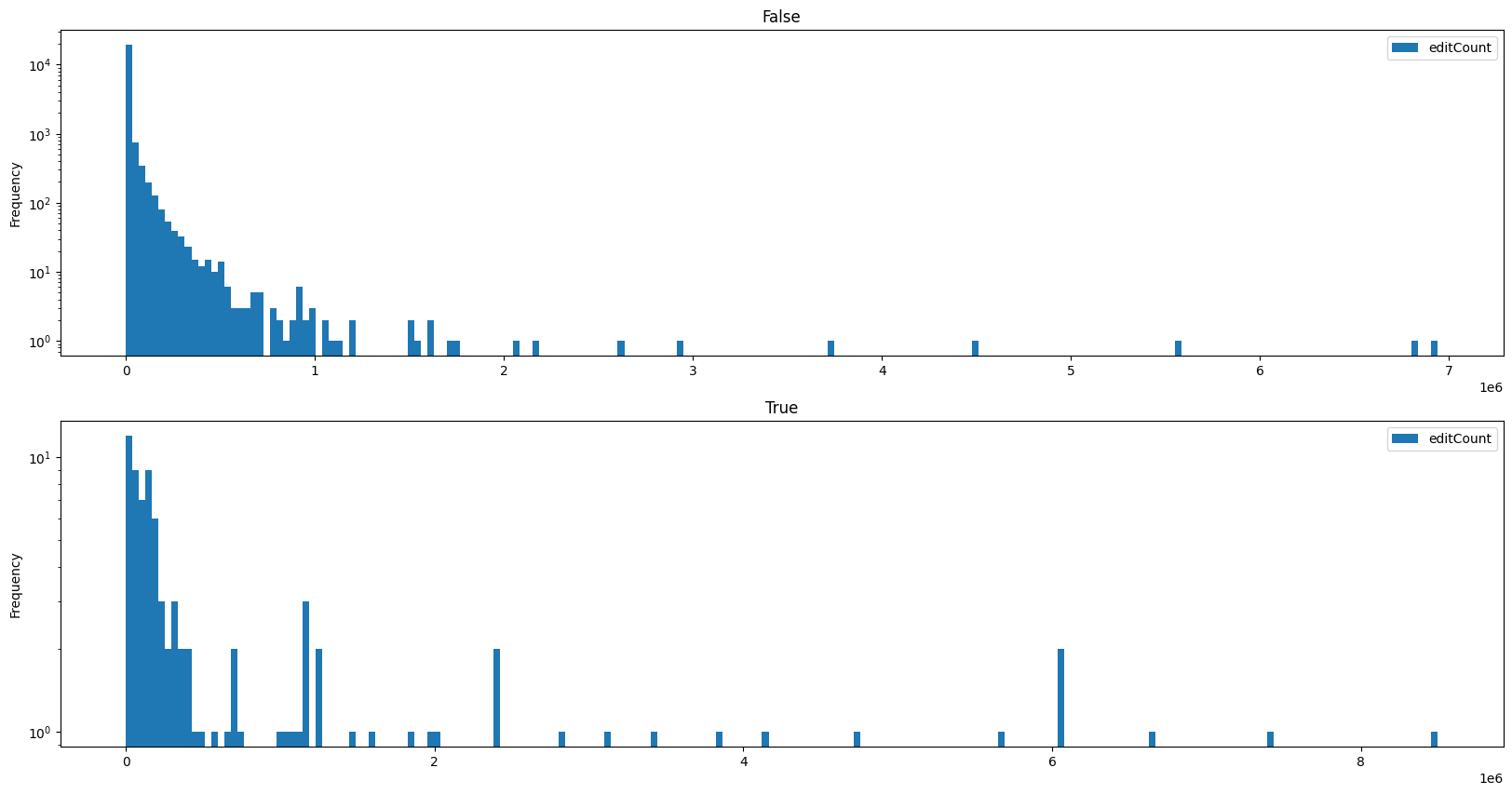
We can now also split this graph into those users who are bots and those who arent:
We can see that amongst the bots, there are more accounts with very large numbers of edits, as one would expect for automated editing. But: Even among the human editors, there are a few outliers that made between 3,000,000 and nearly 7,000,000 edits!
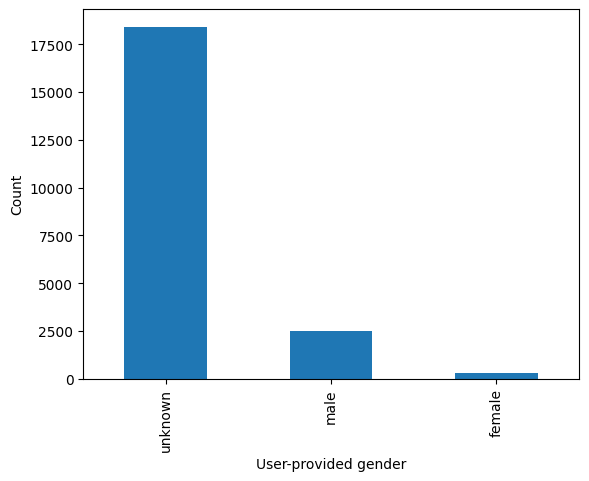
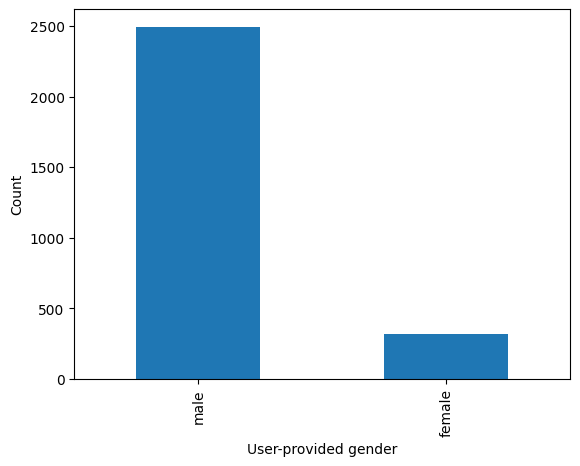
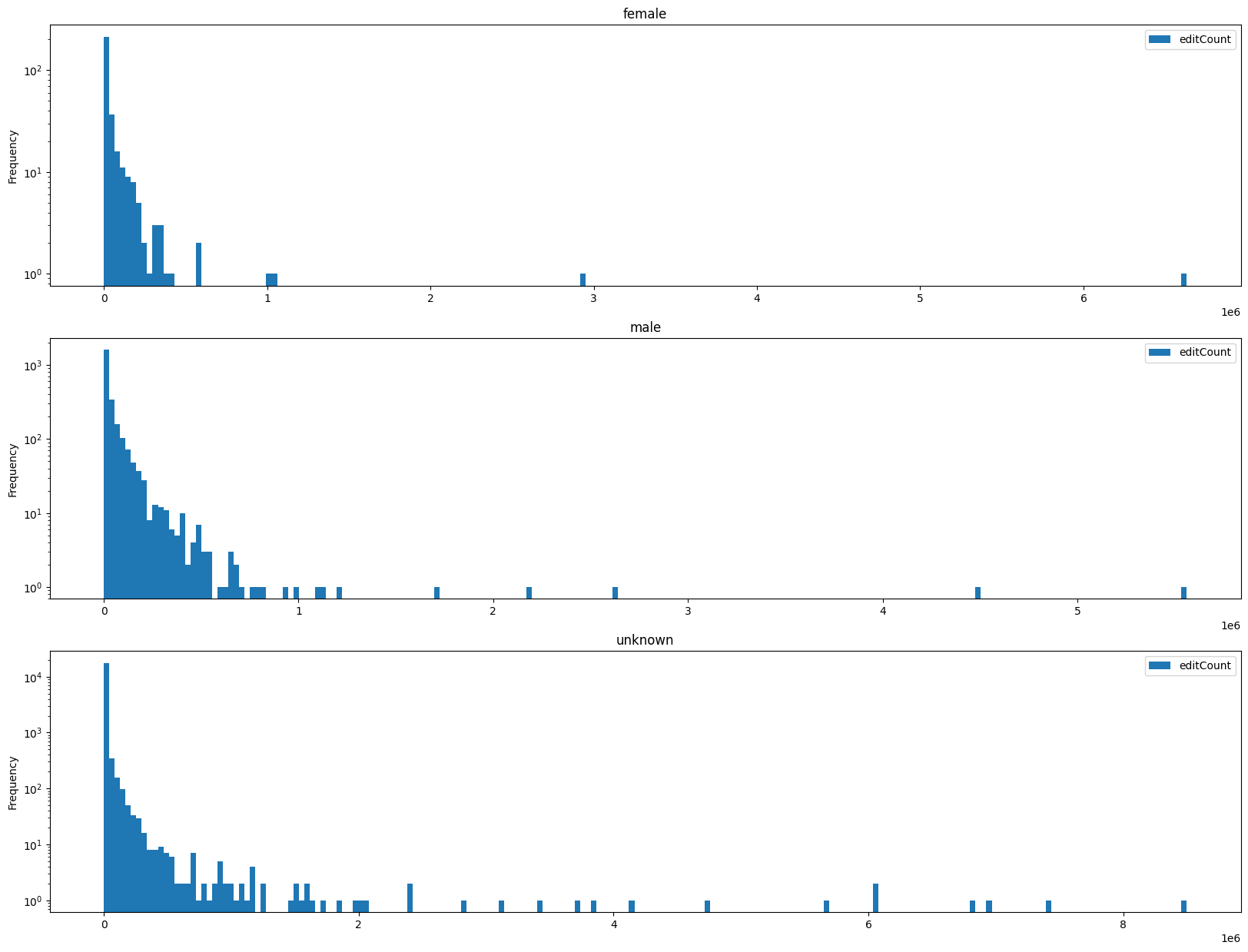
We can now also try to split the graph by the user-provided gender information, after exploring the distribution of responses by users:
We see that the vast majority of users did not specify their gender through the MediaWiki settings. If we focus on the gender breakdown only for the ~3000 users who did specify it, we see that ~15% of users gave their gender as female.
We’ve seen how the MediaWiki Actions API can be interfaced with through the pywikibot library to get details about Wikipedia categories, individual pages along with their editing histories and contributors, and about contributors generally.
We have also explored how we can connect all of these to create a simple data set that we can re-use for more in-depth analyses later on.
But, we have also seen that our way of collecting this data maybe is not ideal yet, as our pages that we sourced from the Kenyan politicans page included unexpected pages, such as the Jomo Kenyatta International Airport. In the next bit, we’ll see how we can query Wikidata to find more specific pages, by filtering for the properties of the page subjects (e.g. if they are people or not).